Session 3 — Interpretation, Communication and Governed Visibility

Interpretation & Communication

Your Organisation × Industrial Linguistics

Session 3 of 3 140-minute facilitated session Last updated: 2026-07-05

Recap & Confidence Checkpoint

Quick recap of Sessions 1 and 2: definitions, handling, traceability, dashboards, decisions.

Clearer?

What feels clearer after Sessions 1 and 2?

Still fuzzy?

What still feels uncertain or under-defined?

Hardest?

Definitions, handling, traceability, dashboards, or communicating a recommendation?

Poll, chat, or voice: all good.
Session 3 Learning Goals

Check claims

Run plain-English checks before over-claiming from small or noisy numbers.

Govern AI exhaust

Recognise prompts, retrievals, transcripts, and summaries as a governed data layer.

Map the estate

Use a metadata-first, proportionate ladder for spreadsheet and document sprawl.

Separate governance

Tell governance apart from surveillance using purpose, notice, proportionality, access, and retention.

Find truth

Design root guides so humans and approved AI tools find the source of truth, not the stale copy.

Communicate

Produce traceable, decision-ready output in the capstone.
AI Exhaust

AI Exhaust = the data debris of AI use

Every AI interaction leaves a trail: "AI exhaust" or "AI debris".

Prompts

What people asked, and the shape of the work they were trying to do.

Retrieved context

Which files, records, or snippets the assistant pulled into the answer.

Audit logs

Who used the tool, when, and under what access pattern.

Transcripts

Chat history, file references, generated summaries, and follow-up prompts.

What AI Exhaust Can Reveal

  • What is being asked of AI
    • Prompt topics, attached files, retrieved sources, frequency, repeat queries — a live read of what work people are actually doing.
  • Where the answers come from
    • Which spreadsheets, drives, documents, and inboxes the AI is reaching into — the de facto source-of-truth map for the agency.

Rich Signal, Dangerous Inference

  • Wrong proxy
    • Prompt volume is not productivity. Reading more is not the same as doing more.
  • Chilling effect
    • If staff believe prompts are being watched, behaviour changes.
  • General privacy problems

AI exhaust game

  • Pick one of the three packs
  • Your job is to infer what operational activity may be happening.
  • Which individual records looked harmless?
  • Which combinations changed the risk?

The data abundance problem

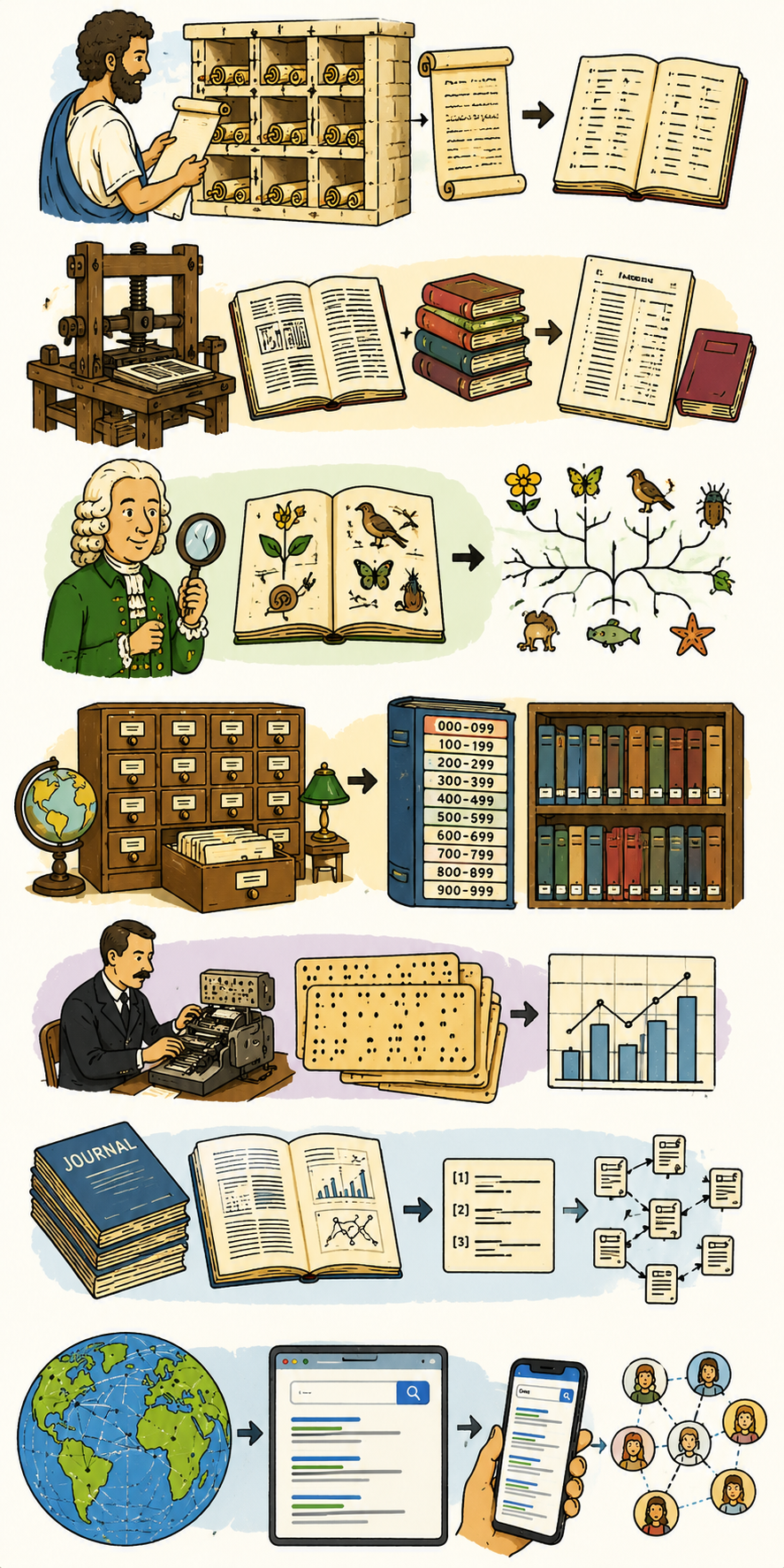
Information Explosions in the Past

  • The pattern: when knowledge becomes too large to hold using previous methods, something has to change.
  • Stephanos of Byzantium → the Ethnika
    • Alphabetical ordering makes encyclopaedic material searchable.
  • Printing press → indexes and bibliographies
    • More books require better tools for finding what is inside them.
  • Linnaeus → taxonomy
    • Classification makes large collections of living things usable.
  • Dewey, catalogues, librarianship
    • Hierarchies of knowledge: what you'll find where.
  • The web → search engines
    • Ranking and retrieval become the interface to too much information.
AI means having a lot more data than we used to

  • Documents get created even for the trivial
    • Meeting notes, automated transcripts and summaries — capturing the everyday because the cost of doing so is near zero.
  • AI exhaust: higher volume, granularity and interpretability
    • Logs and audit trails have always existed; AI creates new exhaust — prompts, retrievals, tool traces — at much higher volume, granularity and interpretability.
  • Too low value in the past
    • AI-generated commentary, induction material and auto-generated primers — content not worth producing manually.
  • Meta-analysis that is new
    • AI sweeps over databases and file shares pulling out language patterns, vocabulary and mentions of people and places.

Implications of Data Explosion

  • Small problem
    • Extra storage required.
    • Buy more storage. Archive more aggressively.
  • Bigger problem
    • Search and retrieval gets worse.
    • Navigation guidance: indexes, catalogues, registers of truth.
  • Even bigger problem
    • Data control systems break down.
    • Deliberate design for what happens at speed and scale.
  • Severity escalates → solutions get structurally harder.
  • More data creates three layered problems — and the answers get structurally harder at every step.

Induction

  • Pick a folder or report, explain the contents there as if your partner is an enthusiastic but naïve intern
  • What did you find yourself explaining?
  • Is there a document already in existence that says what you said?
    • If there is, where is it? Would the intern have found it themselves?
    • If not, how would this intern learn about this folder or report?
  • The key question: is your team’s current systems adequate for today and the future?

Maps

  • The new explosion
    • Drafts, transcripts, summaries and AI outputs multiply faster than humans can read them.
  • What's new this time
    • The volume is machine-generated, so the solution has to be:
      • Machine-readable
      • Human readable
      • Machine-writeable
      • Human-writeable
      • Search-engine friendly
  • What’s needed
    • Indexes that say where to look for documents, what to trust, purposes, definitions, etc.

What’s happening with Agentic AI and software development

  • In software projects, tools such as Codex and Claude Code can use root-level guidance files like AGENTS.md or CLAUDE.md to understand structure, conventions and safe ways of working.
  • Organisations need the same pattern for knowledge

Folder Guides for Everyday Workspaces

  • For the document store, Teams, OneDrive, shared drives, dashboards and spreadsheet estates, the equivalent is a Folder Guide, Knowledge Map, Start Here file or Source-of-Truth note.
  • Typical filenames (usually found in the folder itself):
    • 00_START_HERE — Folder Guide.docx
    • 00_INDEX.md or 00_SOURCE_OF_TRUTH.md
    • README.md
    • AGENTS.md or CLAUDE.md — (e.g. if you use Codex or Claude Cowork)

A Plan for Mapping Spreadsheet Sprawl (and document sprawl in general)

  • 1. Cluster by purpose. Group near-duplicates and abandoned drafts using filename patterns and modification age.
  • 2. Inventory the shape, not the contents. Filenames, owners, locations, last-modified, size, sensitivity labels.
  • 3. Identify what matters. The handful of files doing work become governed datasets with owners, as-at dates, and review points.
  • 4. Make an initial folder roadmap. It does not have to be complete, or perfect.
  • 5. Let the roadmap be updated. If people disagree about sources of truth, it is better to have that documented.
  • 6. Find your upstream users. People who depend on your outputs should document that in the roadmap.

What you will often put in a folder guide

  • Purpose of this folder or knowledge area.
  • Audience and handling level.
  • Most important files to read first.
  • Source-of-truth files; working files versus records.
  • Key spreadsheets and what they are used for.
  • Recurring reports, dashboards and meeting packs.
  • Definitions that matter; known stale, retired or duplicate material.
  • Owner, steward, approver and support contact.
  • Review date and retention/disposal expectation.
  • AI-use notes — what an approved assistant may summarise, what it must not use, what requires human or source-owner confirmation.
  • Other folders or data sources to look at
  • Comments that say “I’m not sure, but I think …”

Activity — Build the Folder Navigator

  • Use the folder from the last exercise (or otherwise use the synthetic example from the website – FarWest site folder navigator)
  • Create a folder guide that would help a new staff member and an AI assistant avoid guessing.
  • It doesn’t have to be perfect or complete and can have “Not sure, might be…”
  • It should have a section for known upstream users, and a note to anyone who uses the folder to add themselves to the upstream users.

The good news

  • Quite a lot of this index creation can be done by AI
  • A sample prompt is on the data-literacy website.
  • Occasionally (e.g. once per month) let it do a long trawl to find relevant documents
  • That will speed up AI for other tasks
  • It will also speed up a lot of human tasks – finding the source of truth is a common problem at Your Organisation.

The source of truth must be easier to find than the stale copy.

Data teams

Who Does What: Working With Data Teams

Who does what, and what a good request from you looks like.

Platform / data engineering

Owns sources, pipelines, and access.
Give them: a clear business question and rough volume.

Analysts / data scientists

Shape questions into analysis and produce the artefact.
Give them: the decision this feeds, the audience, and the deadline.

You, the requester

Own the question, the context, and the decision.
Give them: fast answers to clarifying questions and honest draft review.

Five Kinds of Data Requests

Knowing which lane a request belongs in tells you who to ask, what to hand over, and what "done" looks like.

One-off analysis

A specific decision needs a specific answer, once. Hand over the decision, audience, and deadline.

Recurring report

The same question repeats. This is a maintained artefact, not a weekly copy-paste.

New pipeline or source

Something does not exist yet: a platform or data-engineering request with a business case.

Dashboard product

A published, supported artefact with an owner, a version, and a sunset.

Governed automated output

A script, model, or AI agent produces the answer. Same governance load as a human-authored artefact.

Automation Is Still a Governed Output

  • A scheduled script, a scripted dashboard refresh, a folder guide refresh, an AI-drafted report — the mechanism changes, the obligations don't. All four governance questions still apply.
  • Owner — a named human, not "the script" or "the model". When it breaks or surprises someone, who answers the question?
  • Source — every automated output still stands on a data source. Name it, show its as-at date, and show the last successful run.
  • Review — automation doesn't remove the review, it changes who does it and when. Spot-check a sample; review any logic change before it ships.
  • Handling discipline — an AI-drafted summary of sensitive data is still sensitive data. Classification and access rules don't weaken because the draft was machine-generated.
  • The shorthand — if a human would need to justify sending this, the automation needs the same paperwork. Automation is a delivery mechanism, not a governance exemption.

Data Systems

AI Speed Exposes Data-System Gaps

  • At human speed, weak systems create inconvenience
    • Stale definitions, missing owners and unclear sources cost time and cause occasional mistakes.
  • At AI speed, weak systems create confident, scalable error
    • The same gaps now produce fluent, plausible answers at volume — and pass them on as fact.
  • AI removes the friction that used to slow things down
    • Finding, summarising, drafting and spreading information all happen faster than human review can keep up.
  • The data system now has to be visible, not assumed
    • Source, owner, freshness, definition, handling, review and exception rules need to be explicit and accessible.
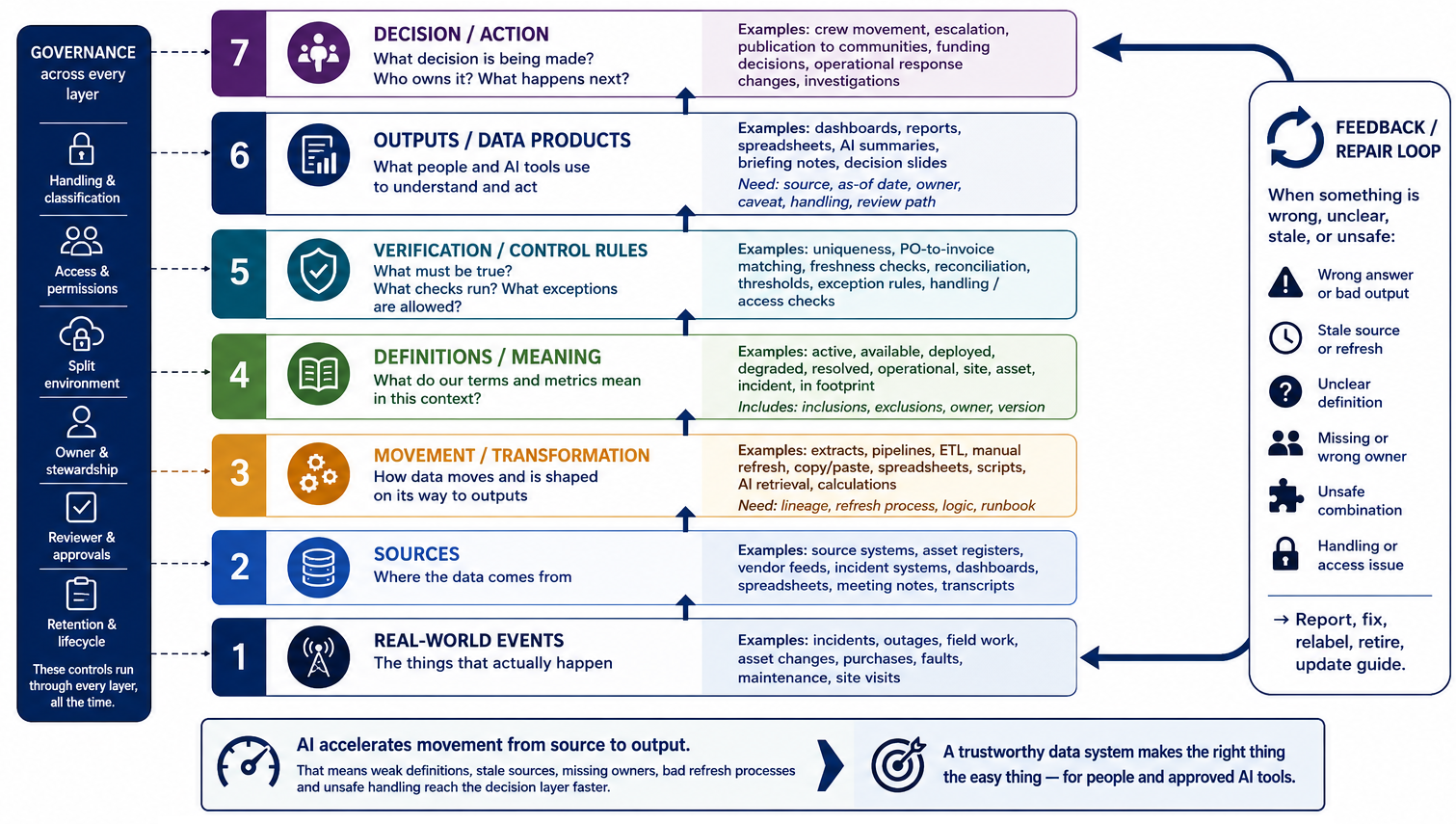
We were protected by slowness

At turtle speed

  • Someone notices a spreadsheet looks old.
  • A person asks which dashboard is authoritative.
  • An analyst remembers that “active” means different things in two systems.
  • Handling rules are applied during review.

At AI speed

  • AI summarises the stale spreadsheet before anyone notices.
  • AI retrieves whichever artefact is easiest to find.
  • AI blends the meanings into a fluent answer.
  • A prompt, screenshot, summary or generated output moves information before review.

From File Finding to System Trust

  • Indexes and maps answer one question
    • Where is the source of truth? Catalogues, registers and root guides tell us where to look.
  • Data systems have to answer more
    • Is it correct, current, authorised, complete, safe to combine and safe to use for this decision?
  • Human onboarding is not enough
    • Inducting people into "how we use this data" was sufficient at human speed. At AI speed the system itself needs data integrity rules. AI can hallucinate and populate false data faster than it can be discovered and corrected.

Data integrity rules: what must always be true?

ObjectWhat must always be true
Incident ticketEvery incident has a unique identifier and severity level.
Cell tower / assetEvery asset ID maps to exactly one physical asset location.
Planned maintenance windowStart time must be before end time, and affected systems must be listed.
Dashboard KPIEvery KPI tile shows source system, refresh time and owner.
Supplier service disruption reportEvery service disruption claim must reference a valid incident or work order.
AI-generated operational summaryEvery summary includes source systems, as-at date, handling classification and human reviewer.
the core operational system Secure -> the shared document repository Corporate exportEvery exported record must have an approved release reason and audit trail.

The kinds of integrity rules that often slip

ObjectWhat must always be true
Coverage dashboardPercentages cannot exceed 100%.
Tower maintenance spreadsheetA completed job cannot still appear as “awaiting approval”.
Customer escalationPriority 1 incidents must have an assigned owner within 15 minutes.
GIS asset mapLatitude/longitude must be inside the service jurisdiction.
Weekly executive briefingNumbers must reconcile with the operational source system.

How do we implement data integrity rules?

  • In database applications, programmers make rules to force it
  • Spreadsheets can enforce data types. (This is often under-used)
    • https://support.microsoft.com/en-us/office/apply-data-validation-to-cells-29fecbcc-d1b9-42c1-9d76-eff3ce5f7249
  • As more work shifts to AI, data integrity rules can be written in human language
Rule typeExample
UniquenessInvoice ID appears once.
ReferentialInvoice links to an existing purchase order.
TemporalClosure date is not before opening date.
Semantic / business-ruleInvoice amount does not exceed remaining PO balance unless exception-coded.
Handling / accessThe extract is not shared outside the approved audience or environment.

Exception Handling Is Part of the System

  • Good data systems do not pretend exceptions never happen. Exceptions get tracked, and there’s a process for flagging it up.
  • Question for every exception
    • Which rule failed? Make the breach explicit so it can be aggregated and trended.
    • Does it block use? Decide whether work pauses, proceeds with caution or proceeds normally.
    • Who investigates? Assign accountability; avoid “someone else will look at it”.
    • What evidence is required? Capture facts, not opinions; standard fields per exception type.
    • How is the exception recorded? Logged in a known place with a unique ID and timestamp.
    • When does it expire or get reviewed? Time-limit every exception; force a re-decision.
    • Can AI summarise it, in which environment? Define the approved tool and handling level for AI use.

Activity — Data Integrity

  • Use a spreadsheet (e.g. the one from the pre-work) or a Power BI dashboard.
  • Pick a few columns of data, take each in turn.
  • What should always be true about this column? (It will always be a number; it will always be newer than another column; it shouldn’t exist unless another column is present).
  • How is that enforced? If it is not enforced, is it documented? Could a human or AI bot accidentally enter impossible data?
  • How should wrong data / exceptions be handled? Is that documented?

Trustworthy data lets you make quantified statements

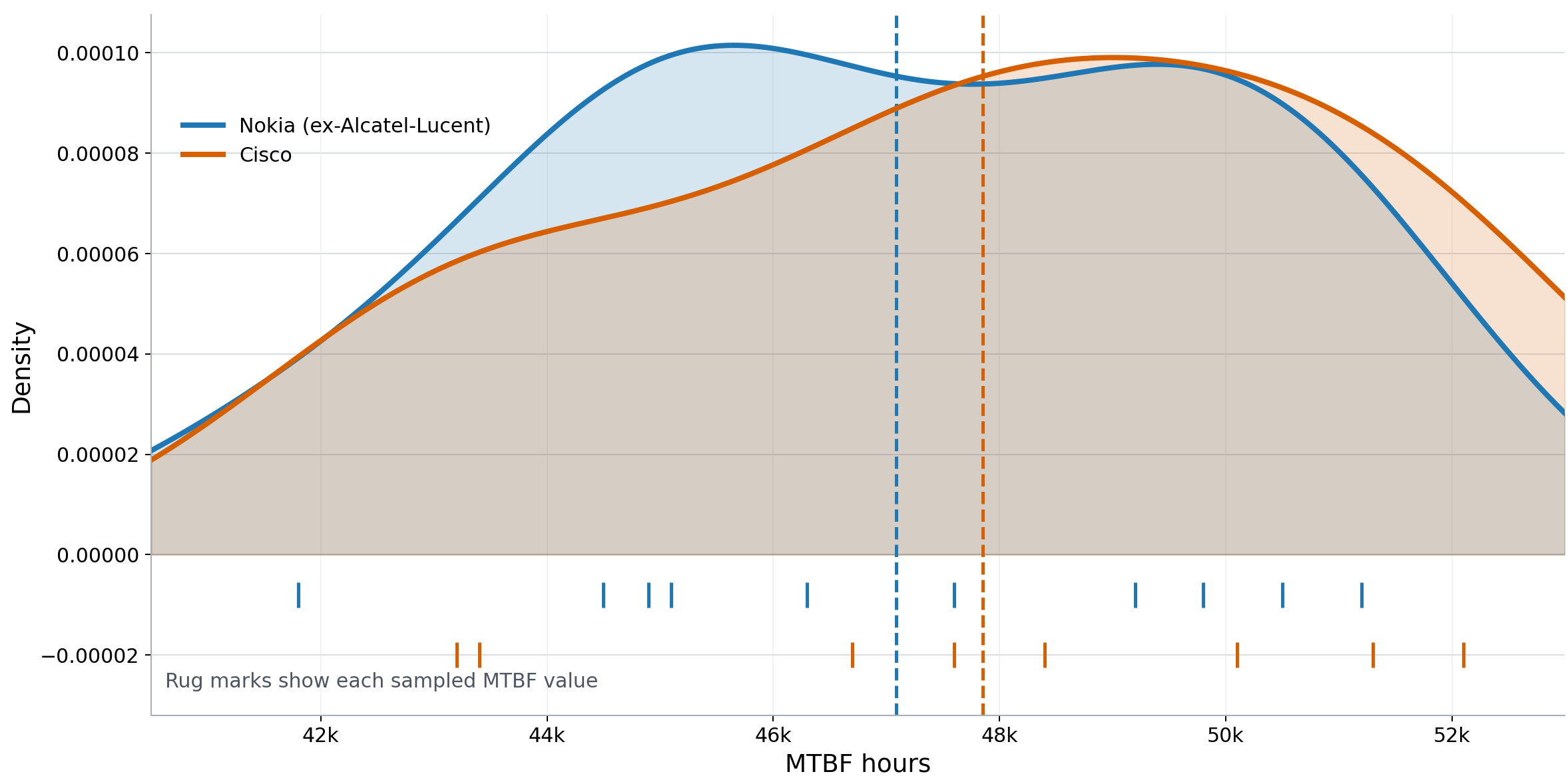
Is Alcatel-Lucent equipment more reliable than Cisco?(completely fake numbers)

  • Nokia (ex-Alcatel-Lucent)
  • Cisco
  • Mean
  • n = 10
  • n = 8
  • MTBF (hours) sampled from incident records.
Statistical tests

  • Reporting mean, median, etc. is table stakes
  • Good AI bots are good at identifying the right statistical test to perform (confirm it of course)
    • Bots can guide you on running the test
    • Can explain the meaning of p-values, R2 values and so on
  • Surprisingly useful resource despite its forbidding name: www.biostathandbook.com
  • Takes you from analytics-like to science-like
  • Mann–Whitney from the previous page’s data…U = 50.5, two-sided p = 0.37 The difference between vendors is not statistically significant.

Other questions where the right way to process data is with statistics

  • Some data questions compare groups
    • Is Nokia / Alcatel-Lucent equipment more reliable than Cisco?
  • Other operational questions are about a repeated metric
    • Is this week worse than usual?
    • Is this month’s backlog a real problem?
    • Is this site, region, or vendor genuinely unusual?
    • Are we seeing a one-off event or a process shift?
  • Or forecasting
    • How many faults will the field crews see next week across the Hunter region?
    • What will the install backlog look like at the end of the month?
    • How many calls will the contact centre take after the next price change?
    • How many connections will we add in Western Sydney over the next quarter?

Wrap-up

The new operational reality

  • Before AI
    • Weak definitions created confusion
    • Spreadsheet drift created inconvenience
    • Stale reports wasted time
    • People compensated with tribal knowledge and human caution
    • Protected by slowness: problems get found with time and enough eyeballs
    • Some number comparisons looked good enough
  • With AI
    • Weak definitions become scalable error
    • Stale spreadsheets become confident summaries
    • Missing governance becomes invisible automation
    • Ambiguous ownership becomes untraceable decisions
    • Iteration speed increases the cost of unclear controls
    • Where decisions depend on uncertainty, effective organisations use explicit probabilities, ranges or confidence language

What we covered across the three sessions

Session 1

Definitions, spreadsheets, thresholds.

Session 2

Governance, handling, artefacts.

Session 3

AI scale, indexing, integrity, communication.

The tomorrow test

  • When you go back to work, ask yourself:
    • Can someone else understand your artefact without guessing?
    • Can they find the source of truth?
    • Is it easier to find the source of truth than the stale copy?
    • Can they tell whether it is current?
    • Can they tell what is safe to share?
    • Could an AI tool use it without creating dangerous confusion?
  • If yes, the artefact is closer to decision-grade.

Five Habits of Good Data Practice

  • Define before you measure. Every key term has one owned definition. Many data problems are definition problems.
  • Own before you share. Every dataset has a named human accountable for it.
  • Use CHORDS when artefacts travel. Caveat, Handling, Owner, Refresh/as-at, Definitions and Source.
  • Source once, reuse often. One source of truth per metric, not five spreadsheets. Many data problems are workflow problems.
  • Document what is authoritative. Not every transcript, draft, or summary belongs in the record. Provide maps so the right data is easier to find than the wrong data.

Summary & Takeaways

  • Session 3 — Interpretation & Communication
  • AI speed exposes data-system gaps. Slowness used to protect us. It no longer does.
  • Integrity rules and exception handling are part of the system, not afterthoughts. Define what must always be true, and what to do when it isn’t.
  • When a decision depends on a difference between groups, check sample size, spread, uncertainty and whether the difference is large enough to matter.
  • For repeated metrics, ask “is this unusual?” Start with a run chart, baseline, and known events before reacting.
  • Treat AI outputs and forecasts as claims to be checked, not evidence to be passed on.
  • With AI, weak definitions can become scalable error. Handling, traceability and ownership need to be visible before reuse.
  • Make the source of truth easier to find than the stale copy.

The one idea to keep

Make the source of truth easier to find than the stale copy.

If it isn't, people — and every AI tool pointed at your data — will keep using the stale one. That's the test behind all three sessions: could someone act on this without coming back to ask?

Transcript