Session Transcript

Decision-Grade for Leaders

Course
Decision-Grade for Leaders
Audience
Senior leaders, sponsors, and managers accountable for evidence-led decisions
Session
Leadership Session — Evidence Before Decisions
Duration
150 minutes
Format
Self-paced transcript adapted from a 150-minute facilitated session
Version
2026.07
Last updated
2026-07-05
Deck
executive
Variant
base
Copyright
Decision-Grade © 2026 Industrial Linguistics

Slide 1 — Decision-Grade for Leaders

Original slide 1

Narration

Welcome to Decision-Grade for Leaders. This is not a Power BI class, and it is not a policy recital. It is a decision-quality session: how to decide whether evidence is safe enough to use before a dashboard, spreadsheet, briefing note, extract or AI output becomes part of a decision.

On-screen text

  • Your Organisation
  • Data judgement for dashboards, spreadsheets, reports and AI outputs • 2.5 hours

Your Organisation

Decision-Grade for Leaders

Data judgement for dashboards, spreadsheets, reports and AI outputs • 2.5 hours

Slide 2 — About me

Original slide 2

Narration

My background sits across data science, software, AI governance, and teaching. That is the connection here. The technical surface matters, but so does the judgement around it: what the data means, where it came from, who owns it, and what can safely be inferred.

On-screen text

  • Image: Greg Baker
  • Greg Baker
  • Data Science lecturer, Macquarie University · Consulting CTO
  • Works across data science, software engineering, AI governance and executive education.
  • Lectures in data science at Macquarie University and has worked as a consulting CTO and adviser across government, enterprise and technology organisations.
  • Focuses on reliable decisions from imperfect data, dashboards, spreadsheets and AI outputs.
  • Clients include ACT Treasury, the Administrative Appeals Tribunal, Allianz, AstraZeneca, Atlassian, Aon, Auckland City Council, the Australian Parliament, Fujitsu, Hewlett-Packard, Vodafone and Woolworths.

About me

Greg Baker

Greg Baker

Data Science lecturer, Macquarie University · Consulting CTO

  • Works across data science, software engineering, AI governance and executive education.
  • Lectures in data science at Macquarie University and has worked as a consulting CTO and adviser across government, enterprise and technology organisations.
  • Focuses on reliable decisions from imperfect data, dashboards, spreadsheets and AI outputs.
  • Clients include ACT Treasury, the Administrative Appeals Tribunal, Allianz, AstraZeneca, Atlassian, Aon, Auckland City Council, the Australian Parliament, Fujitsu, Hewlett-Packard, Vodafone and Woolworths.

Slide 3 — Why Data Governance Matters More With AI

Original slide 7

Narration

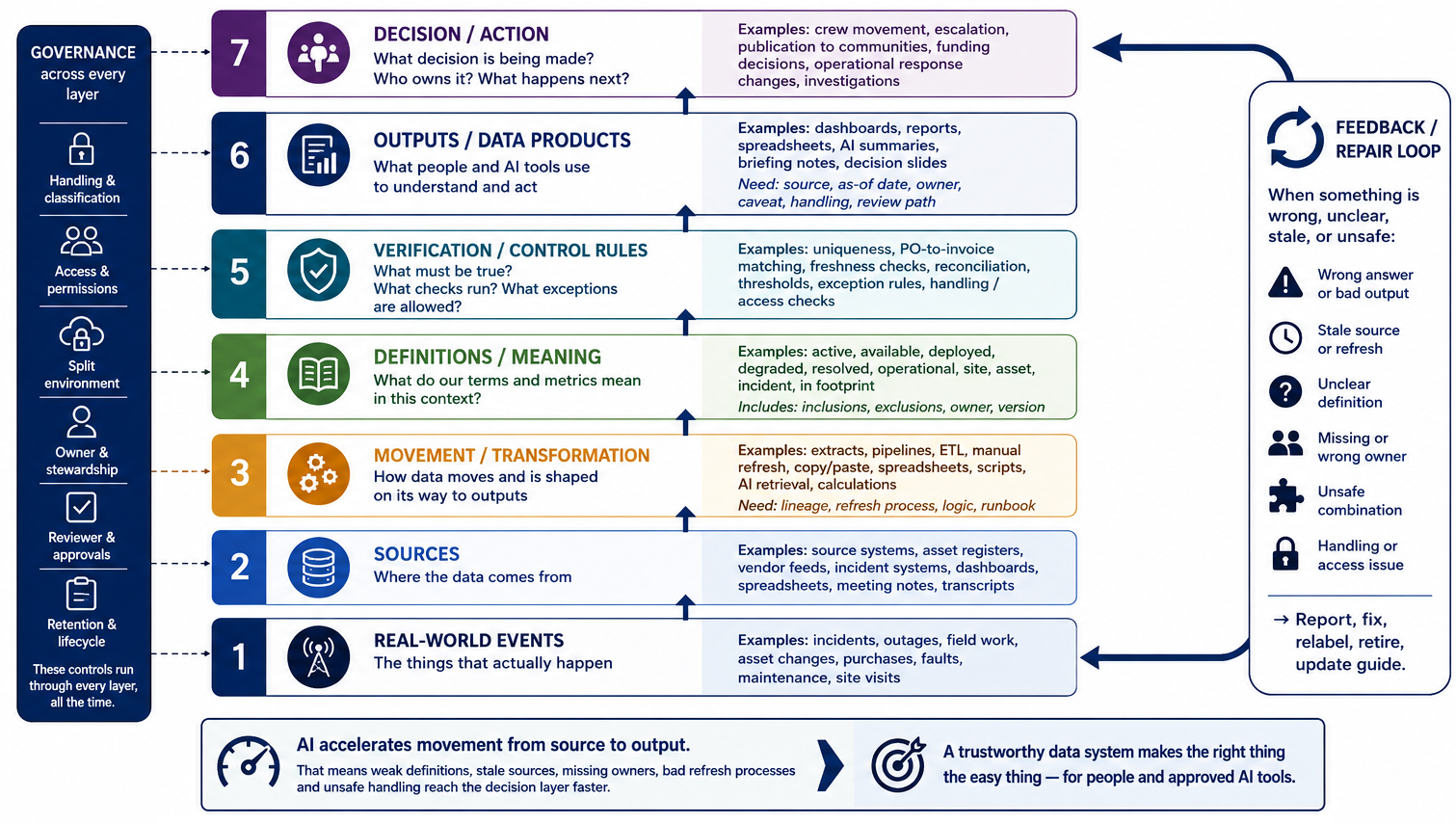
AI multiplies the current state of the data system. Missing owners, stale spreadsheets, unclear definitions, accumulated access, and unlogged transformations travel faster and sound more certain. If an old project folder is still visible to a person, it is also visible to the assistant acting for that person.

On-screen text

  • AI multiplies what you already have — the good and the bad.
  • Models can’t see unwritten context — owner, source, as-at date, caveats, audience. If it’s only in your head, it never reaches the prompt.
  • Inconsistent definitions become inconsistent answers. When “active asset” or “open case” means three different things, an AI assistant may choose one definition, blend them, or answer fluently without exposing the mismatch.
  • Access decisions become retrieval decisions. The assistant inherits whatever stale folders, old projects, and broad permissions the user can still see.
  • Ungoverned spreadsheets get treated as truth. Stale tabs, manual overrides, and “final_v3” files get pasted into prompts.
  • Unlogged transformations can’t be reviewed. A model can summarise your number, but it can’t reconstruct the steps that got you there.
  • Quality thresholds matter more. AI lowers the cost of producing an answer; it doesn’t lower the cost of acting on a wrong one.
  • Speed. Errors caught at human speed have already been forwarded across the organisation at AI speed.

Why Data Governance Matters More With AI

  • AI multiplies what you already have — the good and the bad.
  • Models can’t see unwritten context — owner, source, as-at date, caveats, audience. If it’s only in your head, it never reaches the prompt.
  • Inconsistent definitions become inconsistent answers. When “active asset” or “open case” means three different things, an AI assistant may choose one definition, blend them, or answer fluently without exposing the mismatch.
  • Access decisions become retrieval decisions. The assistant inherits whatever stale folders, old projects, and broad permissions the user can still see.
  • Ungoverned spreadsheets get treated as truth. Stale tabs, manual overrides, and “final_v3” files get pasted into prompts.
  • Unlogged transformations can’t be reviewed. A model can summarise your number, but it can’t reconstruct the steps that got you there.
  • Quality thresholds matter more. AI lowers the cost of producing an answer; it doesn’t lower the cost of acting on a wrong one.
  • Speed. Errors caught at human speed have already been forwarded across the organisation at AI speed.

Slide 4 — The standard for AI-ready evidence

Original slide 8

Narration

If a new colleague needs tribal knowledge to understand an artefact, an AI tool will either miss the context or guess. Ask whether a new starter could identify the source, owner, data currency date, caveat, audience, handling, and review context without asking the one person who has always known how it works.

On-screen text

  • Before a dashboard, spreadsheet, report, extract, or briefing note can safely become AI context , it needs enough data discipline that a new colleague can understand it without guessing — and without undocumented business knowledge.

The standard for AI-ready evidence

Before a dashboard, spreadsheet, report, extract, or briefing note can safely become AI context, it needs enough data discipline that a new colleague can understand it without guessing — and without undocumented business knowledge.

Slide 5 — What we’ll be covering 1/2

Original slide 9

Narration

We start with three leader jobs. First, what governance needs to be in place before AI makes data problems faster. Second, which questions to ask vendors and tools so you do not accept a demo at face value. Third, how to ask for data by starting with the decision, not with the dashboard.

On-screen text

  • Sponsor practical data governance: reinforce need-to-know access, documented purpose, least privilege, review/expiry, and auditability — including the AI exhaust we now generate and folder guides that keep the source of truth easy to find.
  • Ask better vendor/tool questions: require disclosure of AI use, data handling, logging, retraining, change control, monitoring, and review arrangements before approval.
  • Start with the decision, not the dashboard: define the decision, uncertainty, action threshold, time horizon, and evidence needed before asking for reports — because data abundance now makes starting from the data a trap.

What we’ll be covering 1/2

  • Sponsor practical data governance: reinforce need-to-know access, documented purpose, least privilege, review/expiry, and auditability — including the AI exhaust we now generate and folder guides that keep the source of truth easy to find.
  • Ask better vendor/tool questions: require disclosure of AI use, data handling, logging, retraining, change control, monitoring, and review arrangements before approval.
  • Start with the decision, not the dashboard: define the decision, uncertainty, action threshold, time horizon, and evidence needed before asking for reports — because data abundance now makes starting from the data a trap.

Slide 6 — What we’ll be covering 2/2

Original slide 10

Narration

Then we apply the same discipline to reports, dashboards, and AI approvals: what to ask, what not to accept, and which minimum standards to keep reinforcing.

On-screen text

  • Reduce reporting risk: move away from versioned spreadsheets, screenshots, and copied extracts — the sprawl AI now amplifies — toward repeatable, source-connected reporting with clear ownership and traceability.
  • Challenge dashboards for trust cues: ask for source freshness as well as dashboard refresh, clear metric definitions, denominators, owners, caveats, and enough lineage to explain the result.
  • Apply responsible AI oversight: treat sharing with an AI tool as a sharing act, keep data and prompts in approved environments, and ask the core assurance question: “Has this been through the AI assurance process?”
  • TL;DR: what to ask, what not to accept, and what minimum standards to reinforce so teams can use data and AI with less hidden risk.

What we’ll be covering 2/2

  • Reduce reporting risk: move away from versioned spreadsheets, screenshots, and copied extracts — the sprawl AI now amplifies — toward repeatable, source-connected reporting with clear ownership and traceability.
  • Challenge dashboards for trust cues: ask for source freshness as well as dashboard refresh, clear metric definitions, denominators, owners, caveats, and enough lineage to explain the result.
  • Apply responsible AI oversight: treat sharing with an AI tool as a sharing act, keep data and prompts in approved environments, and ask the core assurance question: “Has this been through the AI assurance process?”
  • TL;DR: what to ask, what not to accept, and what minimum standards to reinforce so teams can use data and AI with less hidden risk.

Slide 7 — Risks and governance

Original slide 11

Narration

Use this as a breath: the next slides define roles, handling, leakage, mosaic risk, and vendor assurance.

On-screen text

  • Last updated: 2026

Last updated: 2026

Risks and governance

Slide 8 — Who Owns What? Owner, Custodian, Steward, Author, Approver

Original slide 12

Narration

Owner, custodian, steward, author, and approver are different jobs. AI tools inherit whatever access and approval decisions these roles create.

On-screen text

  • 1. Owner
  • Ultimate authority for the data or artefact; accountable for major use and reuse decisions.
  • 2. Custodian
  • Makes final decisions about classification, access approval, and access requirements. Director level and above.
  • 3. Data Steward / SME
  • SME for definitions, KPI logic, and data-quality expectations; recommends but does not approve access.
  • 4. Author
  • Produces the artefact or runs the workflow that generates it.
  • 5. Approver
  • Signs off that it can be shared or published at the stated marking.
  • Access decision path: steward recommends or helps draft → custodian approves → steward or administrator may execute the change. AI tools sit downstream — they inherit whatever access & approval decisions you make here.

Who Owns What? Owner, Custodian, Steward, Author, Approver

1

Owner

Ultimate authority for the data or artefact; accountable for major use and reuse decisions.

2

Custodian

Makes final decisions about classification, access approval, and access requirements. Director level and above.

3

Data Steward / SME

SME for definitions, KPI logic, and data-quality expectations; recommends but does not approve access.

4

Author

Produces the artefact or runs the workflow that generates it.

5

Approver

Signs off that it can be shared or published at the stated marking.

Access decision path: steward recommends or helps draft → custodian approves → steward or administrator may execute the change. AI tools sit downstream — they inherit whatever access & approval decisions you make here.

Slide 9 — Reframe Classification and Handling

Original slide 13

Narration

Do not stop at where to store it. Ask who should access it, for what purpose, for how long, and under what review.

On-screen text

  • Move from "Where do I put it?" to:
  • "Who should access it, for what purpose, for how long, and under what review?"
  • Leader judgement, least privilege, and sponsorship matter. Memorising the taxonomy is not enough.

Reframe classification and handling

Move from "Where do I put it?" to:
"Who should access it, for what purpose, for how long, and under what review?"

Leader judgement, least privilege, and sponsorship matter. Memorising the taxonomy is not enough.

Slide 10 — You Are the Custodians

Original slide 14

Narration

As leaders, you approve tools, set the sharing tone, and become escalation points when classification or AI use is unclear.

On-screen text

  • Three roles leaders play in data protection:
  • Sponsor — you approve which tools, platforms, and vendors access your team’s data.
  • Gatekeeper — you set the tone for what gets shared, with whom, and through which channels.
  • Escalation point — when classification is unclear, your team looks to you.
  • Custody is not a job for the data team alone — it starts with the decisions you make and the shortcuts you tolerate.

You Are the Custodians

Three roles leaders play in data protection:

  • Sponsor — you approve which tools, platforms, and vendors access your team’s data.
  • Gatekeeper — you set the tone for what gets shared, with whom, and through which channels.
  • Escalation point — when classification is unclear, your team looks to you.

Custody is not a job for the data team alone — it starts with the decisions you make and the shortcuts you tolerate.

Slide 11 — Common Leakage Paths

Original slide 15

Narration

Screenshots, extracts, attachments, local working files, and cross-channel copies are not exotic failures. They are the paths leaders need to control.

On-screen text

  • Forwarded screenshots.
  • Copied extracts.
  • Broad sharing by attachment.
  • Uncontrolled local working files.
  • Context lost when artefacts move between channels.

Common Leakage Paths

  • Forwarded screenshots.
  • Copied extracts.
  • Broad sharing by attachment.
  • Uncontrolled local working files.
  • Context lost when artefacts move between channels.

Slide 12 — Mosaic risk

Original slide 16

Narration

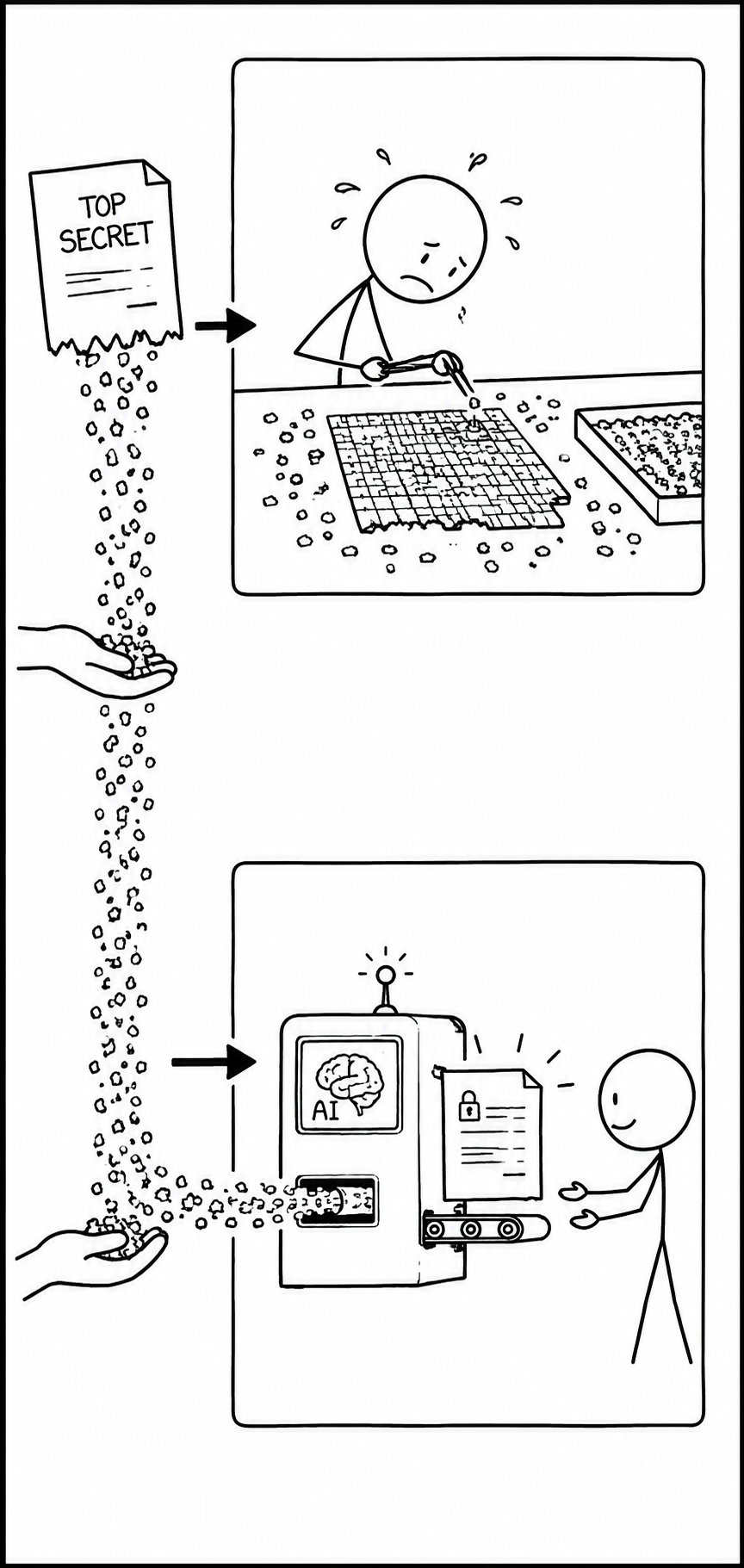
Individually minor fragments can become sensitive when combined. AI makes aggregation cheap enough that people can create a restricted picture by accident.

On-screen text

  • Aggregating lots of minor data points into a complete whole used to be so tedious that no-one would do it.
  • When humans did the aggregating, the snippets of secure data that reached the shared document repository didn't pose a security problem.
  • And if you deliberately aggregated snippets, you knew you were breaking the rules.
  • With AI doing the aggregation, you can accidentally assemble a classified picture in the shared document repository.
  • The usual protocols apply for misclassified data.

Mosaic risk

  • Aggregating lots of minor data points into a complete whole used to be so tedious that no-one would do it.
  • When humans did the aggregating, the snippets of secure data that reached the shared document repository didn't pose a security problem.
  • And if you deliberately aggregated snippets, you knew you were breaking the rules.
  • With AI doing the aggregation, you can accidentally assemble a classified picture in the shared document repository.
    • The usual protocols apply for misclassified data.

Slide 13 — Vendor and Tool Questions

Original slide 17

Narration

The assurance questions are deliberately plain. Has this been through the AI assurance process? What data goes in and what comes out? Can the data be retained or used for retraining? What logging exists? How are updates approved? When is the next review due? Embedded AI features still count as AI use.

On-screen text

  • Default for vendors and contractors: no AI use in delivery until explicitly approved.
  • Questions to ask:
  • Has this been through the AI assurance process?
  • What data goes in, and what comes out?
  • Can data be retained or used for retraining?
  • What logging or traceability exists?
  • How are updates approved? When is the next review due?
  • Embedded AI features still count as AI use.

Vendor and Tool Questions

  • Default for vendors and contractors: no AI use in delivery until explicitly approved.
  • Questions to ask:
    • Has this been through the AI assurance process?
    • What data goes in, and what comes out?
    • Can data be retained or used for retraining?
    • What logging or traceability exists?
    • How are updates approved? When is the next review due?
  • Embedded AI features still count as AI use.

Slide 14 — Multiple choice? Does this contain AI or not? (Government wide the AI assurance process)

Original slide 18

Narration

For each case, decide whether it needs the AI assurance process. Some are obvious, and some depend on how the tool works. Use the exercise to practise the question, not memorise a list.

On-screen text

On-screen text unavailable.

Multiple choice? Does this contain AI or not? (Government wide the AI assurance process)

Slide 15 — We were protected by slowness

Original slide 20

Narration

At human speed, missing owners and stale definitions created inconvenience. That slowness sometimes protected the organisation from errors spreading too far.

On-screen text

  • At turtle speed
  • Someone notices a spreadsheet looks old.
  • A person asks which dashboard is authoritative.
  • An analyst remembers that “active” means different things in two systems.
  • Handling rules are applied during review.
  • At AI speed
  • AI summarises the stale spreadsheet before anyone notices.
  • AI retrieves whichever artefact is easiest to find.
  • AI blends the meanings into a fluent answer.
  • A prompt, screenshot, summary or generated output moves information before review.
  • The failure modes didn’t change — AI just removed the lag that used to let us catch them.

We were protected by slowness

At turtle speed

  • Someone notices a spreadsheet looks old.
  • A person asks which dashboard is authoritative.
  • An analyst remembers that “active” means different things in two systems.
  • Handling rules are applied during review.

At AI speed

  • AI summarises the stale spreadsheet before anyone notices.
  • AI retrieves whichever artefact is easiest to find.
  • AI blends the meanings into a fluent answer.
  • A prompt, screenshot, summary or generated output moves information before review.

The failure modes didn’t change — AI just removed the lag that used to let us catch them.

Slide 16 — AI Speed Exposes Data-System Gaps

Original slide 21

Narration

AI makes it cheap to find, summarise, draft, and forward. Source, owner, freshness, definition, handling, review, and exception rules need to be visible.

On-screen text

  • At human speed, weak systems create inconvenience.
  • Stale definitions, missing owners and unclear sources cost time and cause occasional mistakes.
  • At AI speed, weak systems create errors faster.
  • The same gaps produce fluent, plausible answers and pass them on as fact.
  • AI removes the friction that used to slow things down.
  • Finding, summarising, drafting and spreading all outrun human review.
  • So the data system has to be visible.
  • Source, owner, freshness, definition, handling, review and exception rules must be explicit and accessible.

AI speed exposes data-system gaps

  • At human speed, weak systems create inconvenience.
    • Stale definitions, missing owners and unclear sources cost time and cause occasional mistakes.
  • At AI speed, weak systems create errors faster.
    • The same gaps produce fluent, plausible answers and pass them on as fact.
  • AI removes the friction that used to slow things down.
    • Finding, summarising, drafting and spreading all outrun human review.
  • So the data system has to be visible.
    • Source, owner, freshness, definition, handling, review and exception rules must be explicit and accessible.

Slide 17 — How to request data well

Original slide 22

Narration

How to request data well. The next block is about requests that a person, dashboard builder, or AI assistant can answer without guessing.

On-screen text

  • Last updated: 2026

Last updated: 2026

How to request data well

Slide 18 — BRIDGE: WHAT AI ACTUALLY CHANGES

Original slide 23

Narration

AI makes dashboards, briefs, spreadsheets, and extracts feel similarly easy. That means the leader question changes: which artefact fits the decision? If the request is not clear, people and assistants will drift toward the most ambitious-looking output, usually a dashboard, even when a short brief would have been safer.

On-screen text

  • Effort no longer decides the artefact.
  • Dashboards used to be the hardest artefact to produce, report writing the easiest. AI compresses all four to roughly the same effort.
  • Dashboards
  • Spreadsheets
  • Extracts
  • Report writing
  • Before AI effort scaled with ambition →
  • Max
  • High
  • Medium
  • Low
  • With AI all artefacts now roughly equal
  • Low
  • The trap isn’t that AI lowers quality — it’s that we now reach for the most ambitious artefact by default. The question to ask is what form best fits the decision, not which one looks most impressive or easiest to generate.

Bridge · What AI actually changes

Effort no longer decides the artefact.

Dashboards used to be the hardest artefact to produce, report writing the easiest. AI compresses all four to roughly the same effort.

Dashboards
Spreadsheets
Extracts
Report writing
Before AIeffort scaled with ambition →
Max
High
Medium
Low
With AIall artefacts now roughly equal
Low
Low
Low
Low

The trap isn’t that AI lowers quality — it’s that we now reach for the most ambitious artefact by default. The question to ask is what form best fits the decision, not which one looks most impressive or easiest to generate.

Slide 19 — BRIDGE: DECISION-READY BRIEFS

Original slide 24

Narration

Dashboards monitor changing states. Briefs support a decision. Spreadsheets reconcile bounded lists. Extracts transfer a narrow slice of data. Ask for the form that fits the work, and say how fresh, how complete, and how trustworthy the answer needs to be.

On-screen text

  • What to request
  • Dashboards monitor. A standing view of a changing state for an operational user.
  • Briefs decide. A written recommendation you can act on.
  • Spreadsheets reconcile. A bounded list because you need to sort, filter, or compare.
  • Extracts transfer. A narrow slice of data with source, freshness, caveats, and handling still attached.

Bridge · Decision-Ready Briefs

What to request

  • Dashboards monitor. A standing view of a changing state for an operational user.
  • Briefs decide. A written recommendation you can act on.
  • Spreadsheets reconcile. A bounded list because you need to sort, filter, or compare.
  • Extracts transfer. A narrow slice of data with source, freshness, caveats, and handling still attached.

Slide 20 — Four Steps of a Decision-to-Data Brief

Original slide 25

Narration

A brief that connects decisions to data has four moves. First, name the decision. Second, state the timeframe, freshness requirement, and cut of data. Third, say what action the output should enable. Fourth, define how the output will be checked before anyone relies on it.

On-screen text

  • 1. Name the decision.
  • 2. State timeframe, freshness, and required cut.
  • 3. Say what action the output should enable.
  • 4. Say how you’ll judge whether the output is trustworthy enough to use.

Four Steps of a Decision-to-Data Brief

1

Name the decision.

2

State timeframe, freshness, and required cut.

3

Say what action the output should enable.

4

Say how you’ll judge whether the output is trustworthy enough to use.

Slide 21 — From Vague Request to DATA CART

Original slide 26

Narration

Decision/action, answerable question, threshold, artefact, cut of data, accountable owner, rules/handling, trust test. Human colleagues often fill in missing pieces from context. An AI assistant only has the artefacts and the words in the request, so fill the cart before asking for the answer.

On-screen text

  • Vague request → DATA CART
  • A decision-ready request travels with the checks needed to answer it safely.
  • D — Decision / action
  • A — Answerable question
  • T — Threshold / trigger
  • A — Artefact
  • C — Cut of data
  • A — Accountable owner
  • R — Rules / handling
  • T — Trust Test
  • Spell it out and AI has a chance to answer the question you actually meant.

Vague request → DATA CART

From Vague Request to DATA CART

A decision-ready request travels with the checks needed to answer it safely.

  • D — Decision / action
  • A — Answerable question
  • T — Threshold / trigger
  • A — Artefact
  • C — Cut of data
  • A — Accountable owner
  • R — Rules / handling
  • T — Trust Test

Spell it out and AI has a chance to answer the question you actually meant.

Slide 22 — BRIDGE: DECISION-READY BRIEFS

Original slide 27

Narration

The request becomes usable when the hidden parts are visible: what decision is being made, what threshold matters, which cut of data is needed, who owns it, how it can be handled, and what would make the answer trustworthy.

On-screen text

  • Before and after the rewrite
  • Before: "Give me the latest the operational picture for the priority service area."
  • DATA CART field
  • After
  • Decision / action
  • Stage or deploy additional deployable resources to keep the core operational system running across the priority service area.
  • Answerable question
  • Which sites or deployable resources need support, by location, availability, and capacity, and against what a partner organisation need?
  • Threshold / trigger
  • Act if two or more high-risk sites need support now.
  • Artefact
  • A one-page operational note that references the dashboard — not a new dashboard.
  • Cut of data
  • Site A, Site B, Site C, Site D, Site E, Site F; latest the field status feed update; in-use vs available vs staged status; site risk, a partner organisation requests, and resource availability.
  • Accountable owner
  • Requester and operational owner confirm the decision, approve the brief, and clarify gaps.
  • Rules / handling
  • Use the right label, audience, approved channel, and sharing limits for operational status material.
  • Trust test
  • Reconcile the core operational system dashboard, the field status feed, and the resource log; every item labelled in-use, available, or staged.

Bridge · Decision-Ready Briefs

Before and after the rewrite

Before: "Give me the latest the operational picture for the priority service area."
DATA CART fieldAfter
Decision / actionStage or deploy additional deployable resources to keep the core operational system running across the priority service area.
Answerable questionWhich sites or deployable resources need support, by location, availability, and capacity, and against what a partner organisation need?
Threshold / triggerAct if two or more high-risk sites need support now.
ArtefactA one-page operational note that references the dashboard — not a new dashboard.
Cut of dataSite A, Site B, Site C, Site D, Site E, Site F; latest the field status feed update; in-use vs available vs staged status; site risk, a partner organisation requests, and resource availability.
Accountable ownerRequester and operational owner confirm the decision, approve the brief, and clarify gaps.
Rules / handlingUse the right label, audience, approved channel, and sharing limits for operational status material.
Trust testReconcile the core operational system dashboard, the field status feed, and the resource log; every item labelled in-use, available, or staged.

Slide 23 — Request Rewrite

Original slide 28

Narration

Now practise with a non-sensitive request, or use the synthetic the priority service area example. Rewrite the request as a decision-ready brief and mark any fields that cannot be answered without asking back. Do not brainstorm; produce a structured brief that reduces guessing.

On-screen text

  • Rewrite a vague request into a decision-ready brief — structured, not a brainstorm.
  • Pick a real request you’ve given in the last month.
  • Write the brief against the DATA CART fields.
  • Mark what’s missing — which fields needed a follow-up question?
  • Decide the artefact — dashboard, extract, written answer, or no data at all?
  • No real one? Use the synthetic the priority service area / the core operational system worked example.
  • Optional: the DATA CART helper at https://decision-grade.industrial-linguistics.com/data-cart — synthetic examples only; an external, unsigned demo site, so no real personal, sensitive, or client data.

Request Rewrite

Rewrite a vague request into a decision-ready brief — structured, not a brainstorm.

  • Pick a real request you’ve given in the last month.
  • Write the brief against the DATA CART fields.
  • Mark what’s missing — which fields needed a follow-up question?
  • Decide the artefact — dashboard, extract, written answer, or no data at all?
  • No real one? Use the synthetic the priority service area / the core operational system worked example.

Optional: the DATA CART helper at https://decision-grade.industrial-linguistics.com/data-cart — synthetic examples only; an external, unsigned demo site, so no real personal, sensitive, or client data.

Slide 24 — How to forward data well

Original slide 29

Narration

How to forward data well. Once the answer exists, the next risk is what travels with it and what context is stripped away.

On-screen text

  • Last updated: 2026

Last updated: 2026

How to forward data well

Slide 25 — Travelling vs Non-Travelling Artefacts

Original slide 30

Narration

A forwarded artefact leaves its creator control and needs context. A dashboard or app stays in place but needs product discipline.

On-screen text

  • Travelling artefacts. Forwarded reports, spreadsheets, extracts, status notes, recurring emails, report packs.
  • Leave the creator’s control. Get forwarded, copied, pasted into briefing packs, treated as reusable evidence.
  • Need enough context to survive being separated from the person who made them.
  • Non-travelling artefacts (products). Power BI dashboards, published apps, internal tools.
  • Stay in place. People return to them. Have access settings, refresh schedules, a semantic model behind them.
  • Outlive the original request. Can mislead for weeks if stale, ownerless, or poorly defined.

Travelling vs Non-Travelling Artefacts

  • Travelling artefacts. Forwarded reports, spreadsheets, extracts, status notes, recurring emails, report packs.
    • Leave the creator’s control. Get forwarded, copied, pasted into briefing packs, treated as reusable evidence.
    • Need enough context to survive being separated from the person who made them.
  • Non-travelling artefacts (products). Power BI dashboards, published apps, internal tools.
    • Stay in place. People return to them. Have access settings, refresh schedules, a semantic model behind them.
    • Outlive the original request. Can mislead for weeks if stale, ownerless, or poorly defined.

Slide 26 — Stuff that gets forwarded

Original slide 31

Narration

Caveat, Handling, Owner, Refresh date, Definitions, and Source are the minimum cues that stop an artefact becoming detached from its meaning.

On-screen text

  • If it travels, give it CHORDS .
  • C aveat — the known limit a reader should be told.
  • H andling note — classification and who it can be shared with.
  • O wner — the team or person responsible for it.
  • R efresh / As-of — when the numbers were last refreshed.
  • D efinition — what each key metric actually measures.
  • S ource — where the numbers come from.
  • Data quality and validation was your cohort’s most-raised issue — these are the cues that catch it.

Stuff that gets forwarded

If it travels, give it CHORDS.

  • Caveat — the known limit a reader should be told.
  • Handling note — classification and who it can be shared with.
  • Owner — the team or person responsible for it.
  • Refresh / As-of — when the numbers were last refreshed.
  • Definition — what each key metric actually measures.
  • Source — where the numbers come from.

Data quality and validation was your cohort’s most-raised issue — these are the cues that catch it.

Slide 27 — If CHORDS Isn't in Place, AI Makes These Kinds of Mistakes

Original slide 32

Narration

This is why those six context cues matter. If the caveat is missing, the model can treat a limited extract as authoritative. If the handling note is missing, it can quote material to people who do not need to see it. If the owner, refresh, definitions, or source are missing, it has to guess, and those guesses can sound very confident.

On-screen text

  • Caveat missing — the model states a number with confidence the data doesn’t support.
  • Handling missing — sensitive material gets quoted in an output that travels further than it should.
  • Owner missing — nobody to ask when the answer looks wrong, so the wrong answer ships.
  • Refresh missing — stale figures are presented as the current state of the network.
  • Definition missing — two metrics that sound alike get mixed, and the recommendation tilts the wrong way.
  • Source missing — the model fills the gap with a plausible-sounding but fabricated reference.

If CHORDS Isn't in Place, AI Makes These Kinds of Mistakes

  • Caveat missing — the model states a number with confidence the data doesn’t support.
  • Handling missing — sensitive material gets quoted in an output that travels further than it should.
  • Owner missing — nobody to ask when the answer looks wrong, so the wrong answer ships.
  • Refresh missing — stale figures are presented as the current state of the network.
  • Definition missing — two metrics that sound alike get mixed, and the recommendation tilts the wrong way.
  • Source missing — the model fills the gap with a plausible-sounding but fabricated reference.

Slide 28 — Minimum Safe Sharing Rules

Original slide 33

Narration

TRAVEL before it leaves your hands: tag, reason, audience, venue, evidence and data currency, limit/expiry. Share links where access control matters.

On-screen text

  • TRAVEL is the quick check before information leaves your hands. Keep the data inside approved environments — no personal drives, personal accounts, or unmanaged tools.
  • T — Tag / label the exact your organisation handling marking on the artefact itself.
  • R — Reason the decision or question this will serve, in one line.
  • A — Audience named recipients or a scoped group, not "the team".
  • V — Venue / channel an approved environment appropriate to the marking; share the link, not the file.
  • E — Evidence / as-at named source system and the date the data represents, on the artefact.
  • L — Limit / expiry when the recipient deletes, refreshes, or re-confirms access.
  • Run TRAVEL before it leaves your hands — and share the link, not the file.

Minimum Safe Sharing Rules

TRAVEL is the quick check before information leaves your hands. Keep the data inside approved environments — no personal drives, personal accounts, or unmanaged tools.

  • T — Tag / label the exact your organisation handling marking on the artefact itself.
  • R — Reason the decision or question this will serve, in one line.
  • A — Audience named recipients or a scoped group, not "the team".
  • V — Venue / channel an approved environment appropriate to the marking; share the link, not the file.
  • E — Evidence / as-at named source system and the date the data represents, on the artefact.
  • L — Limit / expiry when the recipient deletes, refreshes, or re-confirms access.

Run TRAVEL before it leaves your hands — and share the link, not the file.

Slide 29 — When the Recipient Is an AI Tool

Original slide 34

Narration

Pasting, uploading, or pointing an AI tool at a folder is a sharing act. In a tool with group memory, the model is not the only recipient; everyone who can later benefit from that memory is part of the audience. Use approved venues, trace outputs back to sources, and do not paste anything you would not be willing to send through the same channel.

On-screen text

  • TRAVEL + AI
  • Pasting into a chat, uploading to a tool, or pointing an agent at a folder is a sharing act. TRAVEL still applies — but four letters change shape.
  • A — Audience: the model is a recipient. Assume the vendor, the training pipeline (if any), and anyone who later prompts it (if there is memory) are part of the audience.
  • V — Venue: use only your organisation-approved AI tools and tenancies. Public Copilot, ChatGPT.com, free Gemini are not approved venues for work content.
  • E — Evidence: AI outputs aren’t sources. Treat them as drafts; trace any number, name, or quote back to the system it came from before it leaves your hands.
  • L — Limit: the model has no expiry. With memory, what you paste in today can resurface in another chat, team, or tenancy. Don’t paste what you wouldn’t email.
  • AI access is still access.

TRAVEL + AI

When the Recipient Is an AI Tool

Pasting into a chat, uploading to a tool, or pointing an agent at a folder is a sharing act. TRAVEL still applies — but four letters change shape.

  • A — Audience: the model is a recipient. Assume the vendor, the training pipeline (if any), and anyone who later prompts it (if there is memory) are part of the audience.
  • V — Venue: use only your organisation-approved AI tools and tenancies. Public Copilot, ChatGPT.com, free Gemini are not approved venues for work content.
  • E — Evidence: AI outputs aren’t sources. Treat them as drafts; trace any number, name, or quote back to the system it came from before it leaves your hands.
  • L — Limit: the model has no expiry. With memory, what you paste in today can resurface in another chat, team, or tenancy. Don’t paste what you wouldn’t email.

AI access is still access.

Slide 30 — AI Doesn't Change Recordkeeping

Original slide 35

Narration

These prompts, pasted content, summaries, and retrieved materials can become records. Retrieval also resurfaces records that should have been disposed of.

On-screen text

  • The records legislation still applies. AI tools just add three places where records hide.
  • Prompts and pasted content are records. Anything you type that documents a decision, advice, or transaction is a State record (the records legislation) the moment you send it — same as an email.
  • Mostly a matter for IT to handle — but don’t have personal chats on work AI!
  • Disposal cuts the other way. A model with retrieval over a the document store site sees what’s there today. Records that should have been disposed of get resurfaced — retention failures become live again.
  • If it’s a record on paper, it’s a record in the prompt.

AI Doesn’t Change Recordkeeping

The records legislation still applies. AI tools just add three places where records hide.

  • Prompts and pasted content are records. Anything you type that documents a decision, advice, or transaction is a State record (the records legislation) the moment you send it — same as an email.
  • Mostly a matter for IT to handle — but don’t have personal chats on work AI!
  • Disposal cuts the other way. A model with retrieval over a the document store site sees what’s there today. Records that should have been disposed of get resurfaced — retention failures become live again.

If it’s a record on paper, it’s a record in the prompt.

Slide 31 — Spreadsheets

Original slide 36

Narration

Spreadsheets. This is not an anti-spreadsheet section. It is about where spreadsheets are fit for purpose and where they turn into uncontrolled data products.

On-screen text

  • Last updated: 2026

Last updated: 2026

Spreadsheets

Slide 32 — AI bots love spreadsheets

Original slide 37

Narration

Spreadsheets are searchable, small, tool-readable, and table-shaped. An assistant can write code to inspect tabs and calculate over rows without loading the whole workbook into the prompt. A well-structured spreadsheet can be genuinely useful; a messy one becomes dangerous when the values are easy to read but the judgement behind them is hidden.

On-screen text

  • Usually named something that is clear and promising.
  • Searching the document store finds it quickly.
  • Bots can read them directly. Approved assistants may have spreadsheet tools; bots that can run code usually have libraries that treat sheets like databases.
  • They don’t take up much of the context window compared to other document formats.
  • Tool-use outputs vs injecting a document.
  • The headers on each tab get read (usually).
  • The values get read more readily than the logic, formatting, or judgement behind them.

AI bots love spreadsheets

  • Usually named something that is clear and promising.
    • Searching the document store finds it quickly.
  • Bots can read them directly. Approved assistants may have spreadsheet tools; bots that can run code usually have libraries that treat sheets like databases.
  • They don’t take up much of the context window compared to other document formats.
    • Tool-use outputs vs injecting a document.
    • The headers on each tab get read (usually).
    • The values get read more readily than the logic, formatting, or judgement behind them.

Slide 33 — Where Spreadsheets Fit — and Where They Become a Risk

Original slide 38

Narration

Spreadsheets are fine for exploration, one-off analysis, and short-lived low-stakes work. They become risky when recurring decisions, hidden logic, multiple versions, and undocumented business rules depend on them. At that point the sheet is no longer just a sheet; it is acting like a system of record.

On-screen text

  • When spreadsheets are fine
  • Ad-hoc exploration, one-off analysis, personal working files.
  • Small, low-stakes, short-lived datasets.
  • When they turn into shadow systems of record
  • Same file is reused for recurring reports or decisions.
  • Logic, overrides, or adjustments live only in the sheet.
  • Different people add rows, columns, exceptions, or meanings over time.
  • Warning signs
  • Multiple versions in circulation; manual merges between files.
  • Hidden logic in cells or macros; uncontrolled extracts from source systems.
  • The spreadsheet is the only place the business rule exists.

Where Spreadsheets Fit — and Where They Become a Risk

When spreadsheets are fine

  • Ad-hoc exploration, one-off analysis, personal working files.
  • Small, low-stakes, short-lived datasets.

When they turn into shadow systems of record

  • Same file is reused for recurring reports or decisions.
  • Logic, overrides, or adjustments live only in the sheet.
  • Different people add rows, columns, exceptions, or meanings over time.

Warning signs

  • Multiple versions in circulation; manual merges between files.
  • Hidden logic in cells or macros; uncontrolled extracts from source systems.
  • The spreadsheet is the only place the business rule exists.

Slide 34 — Why Spreadsheet Sprawl Happens

Original slide 39

Narration

Spreadsheet sprawl usually is not because people love spreadsheets. It is because the spreadsheet is the thing that works today. If nobody can say what should replace it, people keep using it, and pretty soon the spreadsheet is the source of truth because the spreadsheet is the source of truth.

On-screen text

  • Weak source access.
  • Urgent reporting demand.
  • Manual handoffs.
  • No shared evidence standard.
  • Local heroics become the operating model.

Why Spreadsheet Sprawl Happens

  • Weak source access.
  • Urgent reporting demand.
  • Manual handoffs.
  • No shared evidence standard.
  • Local heroics become the operating model.

Slide 35 — SPREADSHEETS

Original slide 40

Narration

Spreadsheets. Keep the distinction in view: a fit-for-purpose spreadsheet is fine; an unmanaged data product is a governance problem.

On-screen text

  • Spreadsheet Risk Spectrum
  • Risk rises with reuse, audience, and dependence on the file for decisions.
  • Low risk — working file: one person, single use, throwaway. E.g. scratchpad for a call.
  • Medium risk — shared working file: small team, reused weekly, still internal. E.g. team tracker with a few manual joins.
  • High risk — quasi-report: emailed to leaders, hidden formulas, owner unclear. Decisions are starting to lean on it.
  • Unsafe — shadow system: recurring decision use, multiple versions, no owner, no audit. The org runs on it; nobody governs it.
  • Signals that shift a file right: reuse, hidden logic, growing audience, recurring decision use.

Spreadsheets

Spreadsheet Risk Spectrum

Risk rises with reuse, audience, and dependence on the file for decisions.

  • Low risk — working file: one person, single use, throwaway. E.g. scratchpad for a call.
  • Medium risk — shared working file: small team, reused weekly, still internal. E.g. team tracker with a few manual joins.
  • High risk — quasi-report: emailed to leaders, hidden formulas, owner unclear. Decisions are starting to lean on it.
  • Unsafe — shadow system: recurring decision use, multiple versions, no owner, no audit. The org runs on it; nobody governs it.

Signals that shift a file right: reuse, hidden logic, growing audience, recurring decision use.

Slide 36 — Why does AI magnify that?

Original slide 41

Narration

AI may find old copies, treat heavily copied files as important, and act on spreadsheet structure without understanding the unwritten rules.

On-screen text

  • Low risk — working file: won’t even be found by a the document store search. Unless you deliberately load it as input, it won’t get used.
  • Medium risk — shared working file: if last week’s version is in the conversation history, it will still be roughly right (usually).
  • High risk — quasi-report: lots of copies in important places — “that version from last year must be very important.”
  • Unsafe — shadow system: “I apologise, I shouldn’t have deleted that file. You were right to call me out on that.”

Why does AI magnify that?

  • Low risk — working file: won’t even be found by a the document store search. Unless you deliberately load it as input, it won’t get used.
  • Medium risk — shared working file: if last week’s version is in the conversation history, it will still be roughly right (usually).
  • High risk — quasi-report: lots of copies in important places — “that version from last year must be very important.”
  • Unsafe — shadow system: “I apologise, I shouldn’t have deleted that file. You were right to call me out on that.”

Slide 37 — SPREADSHEETS

Original slide 42

Narration

Spreadsheets. For AI, the difference matters: a tidy spreadsheet can be inspected, while a workbook full of layout tricks can mislead the assistant.

On-screen text

  • Same Program, Different Cost Boundary
  • Two spreadsheets, same the major capital program program, different answers.
  • View A
  • Tracks your organisation the major capital program delivery costs only — build, commissioning, and your organisation-managed overheads.
  • View B
  • Includes a partner organisation migration, decommissioning of legacy assets, and consequential costs borne by agencies.
  • Both can be technically defensible — they answer different questions, and neither file labels its scope boundary on the front page.
  • A spreadsheet can be technically accurate and still be decision-dangerous when the scope boundary, owner, or inclusion rules are unclear. If humans don’t realise the difference, how will an AI know?

Spreadsheets

Same Program, Different Cost Boundary

Two spreadsheets, same the major capital program program, different answers.

View A

Tracks your organisation the major capital program delivery costs only — build, commissioning, and your organisation-managed overheads.

View B

Includes a partner organisation migration, decommissioning of legacy assets, and consequential costs borne by agencies.

Both can be technically defensible — they answer different questions, and neither file labels its scope boundary on the front page.

A spreadsheet can be technically accurate and still be decision-dangerous when the scope boundary, owner, or inclusion rules are unclear. If humans don’t realise the difference, how will an AI know?

Slide 38 — Spreadsheets don’t always love AI back

Original slide 43

Narration

AI reads spreadsheets best when they behave like data: headers, rows, consistent types, and dictionaries. Merged cells, colours, layout conventions, blank separators, hidden formulas, and macros hide meaning. If the workbook is really an application, the assistant may read the numbers while missing how the application is supposed to work.

On-screen text

  • Easy for AI to understand
  • Tables with headers, one record per row, consistent data types (all dates in one column, all integers…).
  • SUM, MIN, MAX, IF.
  • Data dictionary that says what the columns mean.
  • Pivot tables.
  • Hard for AI to understand
  • What rows you removed.
  • Merged cells.
  • Colour and fonts.
  • Layout conventions: top-left is assumptions; middle is calculations; bottom is outputs.
  • Blank spacer rows.
  • Hidden formulas, macros, and workbook-specific interaction rules.
  • AI is good at reading spreadsheets when the spreadsheet is already behaving like data — much less reliable when it behaves like a picture, a notebook, a dashboard, or an application.

Spreadsheets don’t always love AI back

Easy for AI to understand

  • Tables with headers, one record per row, consistent data types (all dates in one column, all integers…).
  • SUM, MIN, MAX, IF.
  • Data dictionary that says what the columns mean.
  • Pivot tables.

Hard for AI to understand

  • What rows you removed.
  • Merged cells.
  • Colour and fonts.
  • Layout conventions: top-left is assumptions; middle is calculations; bottom is outputs.
  • Blank spacer rows.
  • Hidden formulas, macros, and workbook-specific interaction rules.

AI is good at reading spreadsheets when the spreadsheet is already behaving like data — much less reliable when it behaves like a picture, a notebook, a dashboard, or an application.

Slide 39 — Not all spreadsheets are equal — for humans or AI

Original slide 44

Narration

A spreadsheet can be a working note, tracker, quasi-report, or shadow system. Humans and AI need context to tell the difference.

On-screen text

  • Spreadsheet type
  • Human use
  • AI difficulty
  • Clean data extract
  • Analyse, filter, summarise
  • Easy
  • Simple project tracker
  • Track status, owners, dates
  • Usually easy
  • Risk register
  • Track risks, ratings, actions
  • Moderate; definitions matter
  • Executive report
  • Present selected numbers
  • Moderate to hard; layout and caveats matter
  • Dashboard export
  • Share a dashboard snapshot
  • Moderate; refresh and filters matter
  • Financial model
  • Forecast scenarios
  • Hard; formulas and assumptions matter
  • Operational workbook
  • Run a process
  • Hard; workflow context matters
  • Spreadsheet “app”
  • Tool with inputs, rules, outputs
  • Very hard
  • Messy shared team sheet
  • Ad hoc collaboration
  • Very hard
  • Old spreadsheet with hidden tabs/macros
  • Institutional archaeology
  • Very hard

Not all spreadsheets are equal — for humans or AI

Spreadsheet typeHuman useAI difficulty
Clean data extractAnalyse, filter, summariseEasy
Simple project trackerTrack status, owners, datesUsually easy
Risk registerTrack risks, ratings, actionsModerate; definitions matter
Executive reportPresent selected numbersModerate to hard; layout and caveats matter
Dashboard exportShare a dashboard snapshotModerate; refresh and filters matter
Financial modelForecast scenariosHard; formulas and assumptions matter
Operational workbookRun a processHard; workflow context matters
Spreadsheet “app”Tool with inputs, rules, outputsVery hard
Messy shared team sheetAd hoc collaborationVery hard
Old spreadsheet with hidden tabs/macrosInstitutional archaeologyVery hard

Slide 40 — Spreadsheet Danger Level

Original slide 45

Narration

Choose a familiar spreadsheet, or imagine one from a synthetic example, and score its danger level. Then add the missing context: source, owner, date, caveat, scope boundary, hidden assumptions, or rules about what not to paste into an AI tool.

On-screen text

  • Score a spreadsheet you already use, then decide what context would make it safer.
  • Score it — run the spreadsheet risk scoring artefact at https://decision-grade.industrial-linguistics.com against the sheet you had open earlier. What’s the score?
  • Sense-check it — if it’s high, is that because the sheet is also hard for humans to understand?
  • Add context — what could you write alongside the file to make it safer for humans and AI? For example:
  • “Rows 2–140 are raw incidents; rows 141–150 are summary totals — exclude them from incident counts.”
  • “Red cells mean manually escalated, not necessarily overdue.”
  • “The pivot is filtered to May only and was refreshed yesterday.”
  • “Treat Acme, ACME Pty Ltd, Acme Corp as the same supplier unless checking exact records.”
  • “Sensitive — do not paste personal details into a public AI tool.”

Spreadsheet Danger Level

Score a spreadsheet you already use, then decide what context would make it safer.

  • Score it — run the spreadsheet risk scoring artefact at https://decision-grade.industrial-linguistics.com against the sheet you had open earlier. What’s the score?
  • Sense-check it — if it’s high, is that because the sheet is also hard for humans to understand?
  • Add context — what could you write alongside the file to make it safer for humans and AI? For example:
    • “Rows 2–140 are raw incidents; rows 141–150 are summary totals — exclude them from incident counts.”
    • “Red cells mean manually escalated, not necessarily overdue.”
    • “The pivot is filtered to May only and was refreshed yesterday.”
    • “Treat Acme, ACME Pty Ltd, Acme Corp as the same supplier unless checking exact records.”
    • “Sensitive — do not paste personal details into a public AI tool.”

Slide 41 — Dashboards

Original slide 46

Narration

Dashboards are maintained products, not prettier spreadsheets.

On-screen text

  • Last updated: 2026

Last updated: 2026

Dashboards

Slide 42 — For dashboards, use CHORDS and dashboard clocks

Original slide 47

Narration

Dashboards need owner, version, refresh policy, definitions, limits, support path, review point, and retirement trigger. AI adds a third freshness clock.

On-screen text

  • A Power BI dashboard is a maintained product. It needs a named owner, version, refresh policy, metric definitions, known limits, support path, review point, and retirement trigger.
  • Two clocks — three with AI.
  • Forwarded spreadsheet: one clock — the as-at date.
  • Power BI dashboard: two — when the tile refreshed, and when the upstream source actually changed.
  • With AI layered on top: a third — when the tool last retrieved or indexed the context.

For dashboards, use CHORDS and dashboard clocks

  • A Power BI dashboard is a maintained product. It needs a named owner, version, refresh policy, metric definitions, known limits, support path, review point, and retirement trigger.
  • Two clocks — three with AI.
    • Forwarded spreadsheet: one clock — the as-at date.
    • Power BI dashboard: two — when the tile refreshed, and when the upstream source actually changed.
    • With AI layered on top: a third — when the tool last retrieved or indexed the context.

Slide 43 — Decision-Ready Dashboard Checklist

Original slide 48

Narration

A decision-ready dashboard should show both clocks: dashboard refresh and source refresh. It should also show source and owner, metric and denominator, caveats and exclusions, and enough lineage to explain how the result was produced.

On-screen text

  • Show both refresh dates — dashboard and source.
  • Show source and owner.
  • Define the metric and the denominator.
  • State caveats and exclusions.
  • Show enough lineage to explain how the result was produced.
  • Data quality and validation was your cohort’s most-raised issue — this checklist is what catches it.
  • If a dashboard cannot answer these, treat it as background — not as a basis for action.

Decision-Ready Dashboard Checklist

  • Show both refresh dates — dashboard and source.
  • Show source and owner.
  • Define the metric and the denominator.
  • State caveats and exclusions.
  • Show enough lineage to explain how the result was produced.

Data quality and validation was your cohort’s most-raised issue — this checklist is what catches it.

If a dashboard cannot answer these, treat it as background — not as a basis for action.

Slide 44 — Dashboard Detective: GA Training Dashboard

Original slide 49

Narration

Look for missing source-refresh indicators, definitions, denominator, lineage, and handling/audience markers. Debrief the worst issue and the easiest one to miss. For the recorded version, pause here and do the work individually using synthetic or non-sensitive examples. Allow about 12 minutes before continuing.

On-screen text

  • Dashboard Detective
  • Open the Power BI training dashboard (synthetic data). Spend ten minutes finding what a publisher should have caught.
  • Spot it — missing source-refresh cues; unclear or missing definitions; a percentage with no denominator; copied-extract or local-file lineage; an audience or handling marker that doesn’t match the environment.
  • Note it — for each issue, write one line: what you saw, why it matters, and what you would change before it could be published.
  • Debrief — share the worst issue you found and the one most likely to fool a busy reader. We line them up against the Dashboard-as-a-Data-Product fields.
  • Power BI synthetic training dashboard — link in the chat.

Dashboard Detective

Open the Power BI training dashboard (synthetic data). Spend ten minutes finding what a publisher should have caught.

  • Spot it — missing source-refresh cues; unclear or missing definitions; a percentage with no denominator; copied-extract or local-file lineage; an audience or handling marker that doesn’t match the environment.
  • Note it — for each issue, write one line: what you saw, why it matters, and what you would change before it could be published.
  • Debrief — share the worst issue you found and the one most likely to fool a busy reader. We line them up against the Dashboard-as-a-Data-Product fields.

Power BI synthetic training dashboard — link in the chat.

Slide 45 — AI Exhaust

Original slide 50

Narration

AI exhaust is the residue created by prompts, retrieval, summaries, transcripts, logs, and file references.

On-screen text

On-screen text unavailable.

AI Exhaust

Slide 46 — AI Exhaust = the data debris of AI use

Original slide 51

Narration

Every AI interaction leaves traces. Those traces can become records, evidence, risk signals, sensitive artefacts, or governance data, even if nobody intended them to.

On-screen text

  • Every AI interaction leaves a trail — “AI exhaust” / “AI debris”:
  • Prompts.
  • Retrieved context.
  • Audit logs.
  • File references.
  • Chat transcripts.

AI Exhaust = the data debris of AI use

  • Every AI interaction leaves a trail — “AI exhaust” / “AI debris”:
    • Prompts.
    • Retrieved context.
    • Audit logs.
    • File references.
    • Chat transcripts.

Slide 47 — What AI Exhaust Can Reveal

Original slide 52

Narration

Prompts and retrieved files reveal what people are asking, where answers come from, and which folders or spreadsheets are becoming de facto sources of truth.

On-screen text

  • What is being asked of AI.
  • Prompt topics, attached files, retrieved sources, frequency, repeat queries — a live read of what work people are actually doing.
  • Where the answers come from.
  • Which spreadsheets, drives, documents, and inboxes the AI is reaching into — the de facto source-of-truth map for the agency.

What AI Exhaust Can Reveal

  • What is being asked of AI.
    • Prompt topics, attached files, retrieved sources, frequency, repeat queries — a live read of what work people are actually doing.
  • Where the answers come from.
    • Which spreadsheets, drives, documents, and inboxes the AI is reaching into — the de facto source-of-truth map for the agency.

Slide 48 — Rich Signal, Dangerous Inference

Original slide 53

Narration

Prompt volume is not productivity, reading is not doing, and staff behaviour changes if they believe every prompt is watched.

On-screen text

  • Wrong proxy.
  • Prompt volume is not productivity. Reading more is not the same as doing more.
  • Chilling effect.
  • If staff believe prompts are being watched, behaviour changes.
  • General privacy problems.

Rich Signal, Dangerous Inference

  • Wrong proxy.
    • Prompt volume is not productivity. Reading more is not the same as doing more.
  • Chilling effect.
    • If staff believe prompts are being watched, behaviour changes.
  • General privacy problems.

Slide 49 — AI exhaust game

Original slide 54

Narration

Use one synthetic pack and infer what operational activity might be happening. Notice which individual records looked harmless, and which combinations changed the risk. The learning point is not to become suspicious of every data point; it is to notice when aggregation changes what the data reveals.

On-screen text

  • Pick one of the three packs. Your job: infer what operational activity may be happening.
  • Which individual records looked harmless?
  • Which combinations changed the risk?

AI Exhaust Game

Pick one of the three packs. Your job: infer what operational activity may be happening.

  • Which individual records looked harmless?
  • Which combinations changed the risk?

Slide 50 — The data abundance problem

Original slide 55

Narration

The data abundance problem. AI makes more documents, notes, summaries, traces, and derived material worth managing.

On-screen text

On-screen text unavailable.

The data abundance problem

Slide 51 — Information Explosions in the Past

Original slide 56

Narration

When there is too much material for people to remember by habit, organisations build indexes, taxonomies, catalogues, search engines, and now machine-readable guides.

On-screen text

  • The pattern: when knowledge becomes too large to hold using previous methods, something has to change.
  • Stephanos of Byzantium → the Ethnika.
  • Alphabetical ordering makes encyclopaedic material searchable.
  • Printing press → indexes and bibliographies.
  • More books require better tools for finding what is inside them.
  • Linnaeus → taxonomy.
  • Classification makes large collections of living things usable.
  • Dewey, catalogues, librarianship.
  • Hierarchies of knowledge: what you’ll find where.
  • The web → search engines.
  • Ranking and retrieval become the interface to too much information.

Information Explosions in the Past

The pattern: when knowledge becomes too large to hold using previous methods, something has to change.

  • Stephanos of Byzantium → the Ethnika.
    • Alphabetical ordering makes encyclopaedic material searchable.
  • Printing press → indexes and bibliographies.
    • More books require better tools for finding what is inside them.
  • Linnaeus → taxonomy.
    • Classification makes large collections of living things usable.
  • Dewey, catalogues, librarianship.
    • Hierarchies of knowledge: what you’ll find where.
  • The web → search engines.
    • Ranking and retrieval become the interface to too much information.

Slide 52 — AI means having a lot more data than we used to

Original slide 57

Narration

Low-cost transcripts, summaries, commentary, audit trails, and meta-analysis create material we either did not have before or would not have bothered to produce.

On-screen text

  • Documents get created even for the trivial.
  • Meeting notes, automated transcripts and summaries — capturing the everyday because the cost of doing so is near zero.
  • AI exhaust: higher volume, granularity and interpretability.
  • Logs and audit trails have always existed; AI creates new exhaust — prompts, retrievals, tool traces — at much higher volume, granularity and interpretability.
  • Too low value in the past.
  • AI-generated commentary, induction material and auto-generated primers — content not worth producing manually.
  • Meta-analysis that is new.
  • AI sweeps over databases and file shares pulling out language patterns, vocabulary and mentions of people and places.

AI means having a lot more data than we used to

  • Documents get created even for the trivial.
    • Meeting notes, automated transcripts and summaries — capturing the everyday because the cost of doing so is near zero.
  • AI exhaust: higher volume, granularity and interpretability.
    • Logs and audit trails have always existed; AI creates new exhaust — prompts, retrievals, tool traces — at much higher volume, granularity and interpretability.
  • Too low value in the past.
    • AI-generated commentary, induction material and auto-generated primers — content not worth producing manually.
  • Meta-analysis that is new.
    • AI sweeps over databases and file shares pulling out language patterns, vocabulary and mentions of people and places.

Slide 53 — Implications of Data Explosion

Original slide 58

Narration

Storage is a small problem. AI gives us more transcripts, summaries, drafts, and synthetic notes than we used to create. Search and retrieval are larger. Control systems failing at speed and scale is the largest.

On-screen text

  • More data creates three layered problems — and the answers get structurally harder at every step.
  • Severity escalates →
  • Small problem
  • Extra storage required
  • Meeting transcripts, summaries, drafts, and AI-generated notes accumulate quickly.
  • Bigger problem
  • Search and retrieval gets worse
  • Navigation guidance: indexes, catalogues, registers of truth.
  • Even bigger problem
  • Data control systems break down
  • Deliberate design for what happens at speed and scale.
  • Solutions get structurally harder

Implications of Data Explosion

More data creates three layered problems — and the answers get structurally harder at every step.

Severity escalates →

Small problem

Extra storage required

Meeting transcripts, summaries, drafts, and AI-generated notes accumulate quickly.

Bigger problem

Search and retrieval gets worse

Navigation guidance: indexes, catalogues, registers of truth.

Even bigger problem

Data control systems break down

Deliberate design for what happens at speed and scale.

Solutions get structurally harder

Slide 54 — Induction

Original slide 59

Narration

Pick a folder or report, real or synthetic, and explain it as if you were onboarding a new intern. Notice what you had to explain that is not written anywhere. If the intern would not find that context, an approved AI assistant probably will not find it reliably either.

On-screen text

  • Pick a folder or report. Explain its contents as if your partner is an enthusiastic but naïve intern.
  • What did you find yourself explaining? Is there a document already in existence that says what you said?
  • If there is, where is it? Would the intern have found it themselves?
  • If not, how would this intern learn about this folder or report?
  • Ask: can your team find this context next time, and will an approved assistant find the same thing?

Induction

  • Pick a folder or report. Explain its contents as if your partner is an enthusiastic but naïve intern.
  • What did you find yourself explaining? Is there a document already in existence that says what you said?
    • If there is, where is it? Would the intern have found it themselves?
    • If not, how would this intern learn about this folder or report?
  • Ask: can your team find this context next time, and will an approved assistant find the same thing?

Slide 55 — Maps

Original slide 60

Narration

AI and human readers both need indexes that say where to look, what to trust, what definitions mean, and what sources are authoritative.

On-screen text

  • The new explosion. Drafts, transcripts, summaries and AI outputs multiply faster than humans can read them.
  • What’s new this time. The volume is machine-generated, so the solution has to be all of:
  • Machine-readable and human-readable.
  • Machine-writeable and human-writeable.
  • Search-engine friendly.
  • What’s needed. Indexes that say where to look for documents, what to trust, purposes, definitions, and more.

Maps

  • The new explosion. Drafts, transcripts, summaries and AI outputs multiply faster than humans can read them.
  • What’s new this time. The volume is machine-generated, so the solution has to be all of:
    • Machine-readable and human-readable.
    • Machine-writeable and human-writeable.
    • Search-engine friendly.
  • What’s needed. Indexes that say where to look for documents, what to trust, purposes, definitions, and more.

Slide 56 — What’s happening with Agentic AI and software development

Original slide 61

Narration

In software projects, modern coding tools read project guidance files to learn where things are, what conventions matter, and what not to touch. The same idea belongs in ordinary workspaces: SharePoint, Teams, shared drives, dashboards, and spreadsheet estates need a start-here file or folder guide that tells people and tools what to trust.

On-screen text

  • In software projects, tools such as Codex and Claude Code can use root-level guidance files like AGENTS.md or CLAUDE.md to understand structure, conventions and safe ways of working.
  • Organisations need the same pattern for knowledge

What’s happening with Agentic AI and software development

  • In software projects, tools such as Codex and Claude Code can use root-level guidance files like AGENTS.md or CLAUDE.md to understand structure, conventions and safe ways of working.
  • Organisations need the same pattern for knowledge

Slide 57 — Folder Guides for Everyday Workspaces

Original slide 62

Narration

For the document store, Teams, dashboards, and spreadsheet estates, a start-here or source-of-truth note helps humans and approved assistants avoid guessing. An assistant can draft the first version by inspecting the workspace, but the accountable owner still has to correct what is authoritative, stale, caveated, or out of scope.

On-screen text

  • Everyday workspaces need a Folder Guide. For the document store, Teams, OneDrive, shared drives, dashboards and spreadsheet estates, the equivalent is a Folder Guide, Knowledge Map, Start Here file, or Source-of-Truth note.
  • Approved AI can help draft it. Ask it to inspect the folder, propose the map, then have the accountable owner correct what is authoritative.
  • Typical filenames — usually found in the folder itself
  • 00_START_HERE — Folder Guide.docx
  • 00_INDEX.md or 00_SOURCE_OF_TRUTH.md
  • README.md
  • AGENTS.md or CLAUDE.md — e.g. if you use Codex or Claude Cowork

Folder Guides for Everyday Workspaces

  • Everyday workspaces need a Folder Guide. For the document store, Teams, OneDrive, shared drives, dashboards and spreadsheet estates, the equivalent is a Folder Guide, Knowledge Map, Start Here file, or Source-of-Truth note.
  • Approved AI can help draft it. Ask it to inspect the folder, propose the map, then have the accountable owner correct what is authoritative.

Typical filenames — usually found in the folder itself

  • 00_START_HERE — Folder Guide.docx
  • 00_INDEX.md or 00_SOURCE_OF_TRUTH.md
  • README.md
  • AGENTS.md or CLAUDE.md — e.g. if you use Codex or Claude Cowork

Slide 58 — A Plan for Mapping Spreadsheet Sprawl (and document sprawl in general)

Original slide 63

Narration

Start by clustering files by purpose. For each cluster, record the shape of the inventory, the working files that matter, the update path, the roadmap, and the upstream user groups.

On-screen text

  • 1. Cluster by purpose. Group near-duplicates and abandoned drafts using filename patterns and modification age.
  • 2. Inventory the shape, not the contents. Filenames, owners, locations, last-modified, size, sensitivity labels.
  • 3. Identify what matters. The handful of files that are doing work become governed datasets with owners, as-at dates, and review points.
  • 4. Make an initial folder roadmap (index). It doesn’t have to be complete, or perfect.
  • 5. Let the roadmap be updated. If people disagree about sources of truth, it’s better to have that documented.
  • 6. Find your upstream users. People who depend on your outputs should be encouraged to document that in the roadmap.

A Plan for Mapping Spreadsheet Sprawl (and document sprawl in general)

  • 1. Cluster by purpose. Group near-duplicates and abandoned drafts using filename patterns and modification age.
  • 2. Inventory the shape, not the contents. Filenames, owners, locations, last-modified, size, sensitivity labels.
  • 3. Identify what matters. The handful of files that are doing work become governed datasets with owners, as-at dates, and review points.
  • 4. Make an initial folder roadmap (index). It doesn’t have to be complete, or perfect.
  • 5. Let the roadmap be updated. If people disagree about sources of truth, it’s better to have that documented.
  • 6. Find your upstream users. People who depend on your outputs should be encouraged to document that in the roadmap.

Slide 59 — What you will often put in a folder guide

Original slide 64

Narration

Purpose, audience, source-of-truth files, working files versus records, key spreadsheets, reports, definitions, owner, review date, retention, and AI-use notes.

On-screen text

  • Purpose of this folder or knowledge area.
  • Audience and handling level.
  • Most important files to read first.
  • Source-of-truth files; working files versus records.
  • Key spreadsheets and what they are used for.
  • Recurring reports, dashboards and meeting packs.
  • Definitions that matter; known stale, retired or duplicate material.
  • Owner, steward, approver and support contact.
  • Review date and retention/disposal expectation.
  • AI-use notes — what an approved assistant may summarise, what it must not use, what requires human or source-owner confirmation.
  • Other folders or data sources to look at.
  • Comments that say “I’m not sure, but I think …”

What you will often put in a folder guide

  • Purpose of this folder or knowledge area.
  • Audience and handling level.
  • Most important files to read first.
  • Source-of-truth files; working files versus records.
  • Key spreadsheets and what they are used for.
  • Recurring reports, dashboards and meeting packs.
  • Definitions that matter; known stale, retired or duplicate material.
  • Owner, steward, approver and support contact.
  • Review date and retention/disposal expectation.
  • AI-use notes — what an approved assistant may summarise, what it must not use, what requires human or source-owner confirmation.
  • Other folders or data sources to look at.
  • Comments that say “I’m not sure, but I think …”

Slide 60 — Activity — Build the Folder Navigator

Original slide 65

Narration

Draft a folder navigator that helps a new staff member and an approved AI assistant avoid guessing. It does not need to be complete or perfect. A rough source-of-truth note, with uncertainty made visible, is much safer than relying on unwritten tribal knowledge.

On-screen text

  • Build the Folder Navigator
  • Use the folder from the last exercise — or the synthetic FarWest site folder navigator from the website.
  • Create a folder guide that helps a new staff member and an AI assistant avoid guessing.
  • It doesn’t have to be perfect or complete — “Not sure, might be…” is fine.
  • Include known upstream users — with a note asking anyone who uses the folder to add themselves to the list.

Build the Folder Navigator

Use the folder from the last exercise — or the synthetic FarWest site folder navigator from the website.

  • Create a folder guide that helps a new staff member and an AI assistant avoid guessing.
  • It doesn’t have to be perfect or complete — “Not sure, might be…” is fine.
  • Include known upstream users — with a note asking anyone who uses the folder to add themselves to the list.

Slide 61 — The good news

Original slide 66

Narration

Approved AI can search through workspaces and draft indexes, which speeds both human work and later AI work. That only helps if the work stays governed and a human reviews the map.

On-screen text

  • Much of this index creation can be done by AI. A sample prompt is on the data-literacy website.
  • Run a long trawl occasionally — e.g. once a month, let it sweep for relevant documents.
  • It speeds up AI for other tasks.
  • It speeds up human tasks too. Finding the source of truth is a common problem at Your Organisation.

The good news

  • Much of this index creation can be done by AI. A sample prompt is on the data-literacy website.
  • Run a long trawl occasionally — e.g. once a month, let it sweep for relevant documents.
  • It speeds up AI for other tasks.
  • It speeds up human tasks too. Finding the source of truth is a common problem at Your Organisation.

Slide 62 — The source of truth must be easier to find than the stale copy.

Original slide 67

Narration

The source of truth must be easier to find than the stale copy. If the stale copy has the better title, the clearer location, or the easier search hit, both people and AI will keep using it.

On-screen text

On-screen text unavailable.

The source of truth must be easier to find than the stale copy.

Slide 63 — What leaders should now ask

Original slide 69

Narration

The leader habit is to ask these questions before evidence becomes action. What decision will this support? What definition, denominator and threshold are being used? How fresh is the source, not just the dashboard? Who owns the artefact? What caveat or handling rule must travel with it? Has any AI use been through the approved assurance process? If those answers are visible, the evidence is closer to decision-grade.

On-screen text

  • Before evidence travels into a decision
  • What decision will this support?
  • What definition, denominator and threshold are being used?
  • How fresh is the source, not just the dashboard?
  • Who owns the artefact?
  • What caveat or handling rule must travel with it?
  • Has any AI use been through the approved assurance process?
  • Where to look: approved tools list • AI hub / guidance • handling and classification guidance • who to ask when unsure

What leaders should now ask

Before evidence travels into a decision

  • What decision will this support?
  • What definition, denominator and threshold are being used?
  • How fresh is the source, not just the dashboard?
  • Who owns the artefact?
  • What caveat or handling rule must travel with it?
  • Has any AI use been through the approved assurance process?

Where to look: approved tools list  •  AI hub / guidance  •  handling and classification guidance  •  who to ask when unsure